


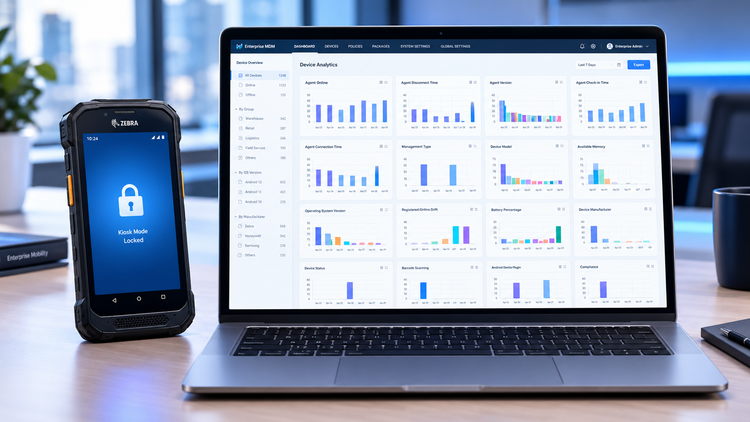

Managing a distributed fleet of dedicated Android devices introduces operational challenges that consumer management platforms were never built to solve. When hardware is deployed across regional warehouses, retail outlets, or manufacturing floors, unmanaged units frequently suffer from unintended configuration changes, stalled software rollouts, and unexpected freezes that demand physical on-site intervention.
Under standard Android Enterprise architectures, teams can resolve these operational bottlenecks by combining interface lockdown, off-peak package distribution, and over-the-air administrative diagnostics.
The following practical guide outlines how these components function together in field operations.
Restricting frontline hardware to approved business workflows
Frontline hardware deployed in logistics and retail environments should operate exclusively as single-purpose or task-specific appliances. When workers have access to standard system menus, pull-down notification panels, or unconstrained navigation keys, well-intentioned curiosity often leads to accidental network disconnects, battery-draining background tasks, or unauthorized third-party application usage. Consumer-grade app pinning remains insufficient in professional environments because users can exit the pinned screen using simple hardware button combinations.
Android Enterprise fully managed mode gives administrators the system-level tools needed to restrict edge interaction.
- Administrators can lock hardware into a single business application or supply a multi-app launcher using custom URI schemes.
The
Launch://scheme restores an existing task stack, whereasLaunchalways://forces a fresh application instance on every tap to clear previous session states and transient errors.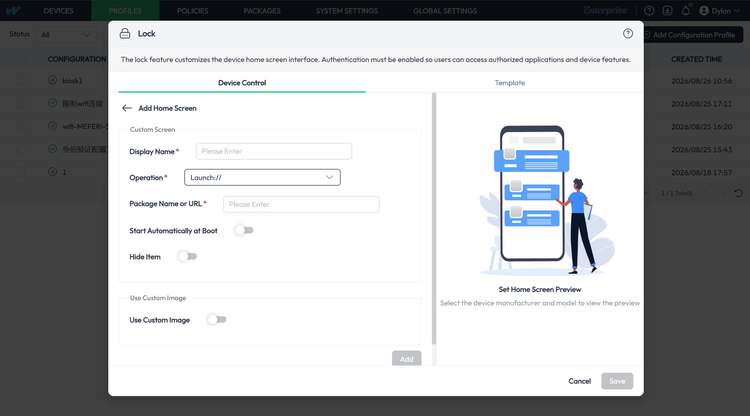
- Approved enterprise software can be granted access to the recent tasks switcher through
Launchwithrecents://while keeping the rest of the operating system quarantined. - Management profiles can suppress the status bar, block the quick-settings pull-down curtain, and mask system navigation buttons.
- Policy controls can restrict Wi-Fi connectivity to corporate SSIDs, disable external USB storage, block Bluetooth pairing, and prevent recovery mode access via hardware button combinations.
Automating software deployments during non-operational hours
Distributing proprietary software or third-party business packages across hundreds of remote units presents timing and reliability concerns. When updates depend on on-screen operator acceptance, software versions across shifts diverge, complicating bug tracking and operational consistency.
Managing applications through a structured MDM pipeline allows updates to be scheduled during non-operational hours.
- Managed Google Play configurations allow administrators to restrict updates to daily maintenance windows lasting between 30 minutes and 24 hours.
- Installations execute automatically when hardware is idle, charging, or running non-conflicting background processes.
- Custom software packages can bind pre-installation scripts to terminate conflicting processes such as
kill_applicationbefore pushing new files. - Post-installation scripts can automate maintenance tasks like clearing application cache with
clearappcacheand relaunching the primary activity. - Centralized deployments under Fully Managed mode install without prompting the end user on the physical screen.
- For specialized hardware, certified OEM device plugins supply additional low-level support for silent administrative installations.
Why does traditional remote access fail on unattended Android hardware?
When edge hardware experiences software exceptions, freezing, or localized network misconfigurations, administrative teams require over-the-air visibility to resolve issues without physical inspections.
Modern versions of Android prioritize platform privacy, which introduces specific constraints for remote administration workflows.
- Standard Android operating system privacy frameworks introduce a
MediaProjectionconsent prompt that halts unattended remote access if no one taps "Start Now" on the physical screen. - In an empty warehouse or an unattended kiosk, this prompt blocks remote technicians entirely, forcing someone to drive to the location.
- For supported hardware manufacturers like Meferi and Urovo, certified Device Plugins deploy during enrollment to enable screen streaming and touch injection without local confirmation.
- Remote administrators can extract raw Android Logcat files and diagnostic ZIP packages over the air to diagnose crashes without physical ADB cables.
- Console actions can trigger multi-channel alerts combining ringers, vibrations, flashlights, and display strobes to locate misplaced warehouse scanners.
Do dedicated fleets actually benefit from general MDM suites?
Enterprise mobility architectures have evolved significantly from legacy multi-platform suites toward specialized Android Enterprise frameworks.
| Evaluation Area | General Multi-Platform MDM | Dedicated Android Enterprise MDM |
|---|---|---|
| Core Focus | Broad support across desktop and mobile platforms | Specialized for dedicated, single-use Android endpoints |
| Unattended Remote Control | Often blocked by standard screen prompts unless custom add-ons exist | Integrated via certified device plugins for prompt-free field support |
| Device Provisioning | Manual enrollment URLs or complex portal configurations | Standardized 6-tap QR onboarding and Google Zero-Touch integration |
| Diagnostic Visibility | High-level status reporting with limited low-level debugging | Native over-the-air Logcat extraction and custom scripting hooks |
Validating deployment workflows in a staging environment
Establishing a reliable operating baseline for dedicated Android equipment requires matching operational requirements with standard operating system capabilities.
Organizations evaluating their device management strategies can test foundational Kiosk profiles, scheduled package deployments, and remote administrative tools on a staging group of devices to observe deployment behavior before fleet-wide rollout.
Request a technical walkthrough or staging trial
If your team is evaluating deployment strategies for dedicated Android hardware, get in touch with us to schedule a live product walkthrough or request trial access for your staging environment. You can submit your requirements through the button below at any time.
Our team can assist you in configuring baseline Kiosk lockdown profiles, verifying scheduled background package updates, and evaluating remote diagnostics directly on your target hardware before committing to a full deployment.
Compatible with standard Android Enterprise hardware. Staging accounts provisioned for verified business domains.


